Measuring Translation Quality at Scale
Note: This case study is based on real work completed at Amazon. Specific internal systems have been generalized or omitted to respect confidentiality.
In 2022, I owned UX design for this project from concept to launch, partnering closely with our product manager, localization program managers, and engineering leads. My focus was on simplifying a high-effort, low-reward task, error logging, and transforming it into a smooth, intuitive workflow that could scale. The work included:
Research synthesis and pain point definition
Interaction design and prototyping
Usability testing with freelance reviewers
Collaboration on feature prioritization and roadmap
Human QA Was Too Slow for AI Growth
At Amazon’s scale, translation is infrastructure. Thousands of product pages, help articles, and system messages are updated weekly across dozens of languages. Machine translation enabled this scale, but it raised the stakes for quality assurance.
We lacked a scalable way to evaluate content quality—both for linguists and for tuning future models. QA reviewers logged issues in spreadsheets, disconnected from where they reviewed or edited translations. That made scoring slow, manual, and inconsistent.
We needed to measure quality in a way that helped linguists work faster now, and trained better systems later.
Reviewers Needed Context and Speed
User interviews and observations showed how freelance linguists juggled fragmented workflows and tight deadlines. They were editing short segments of text, then switching tools to log errors—adding friction and mistakes. And because the rules varied by project, reviewers often lacked clarity on what “good” looked like.
We narrowed down their core needs to the following:
Understand requirements so they can focus on the types of errors that matter most.
Log issues quickly after they make edits to the translation.
Review their work before submitting the final revisions and score.
After conducting interviews with internal program managers, we confirmed that these issues led to missed deadlines, inconsistent quality bars, and reviewer churn. To keep QA work attractive, we needed a tool that respected their time and made their effort visible.
The Scoring Panel
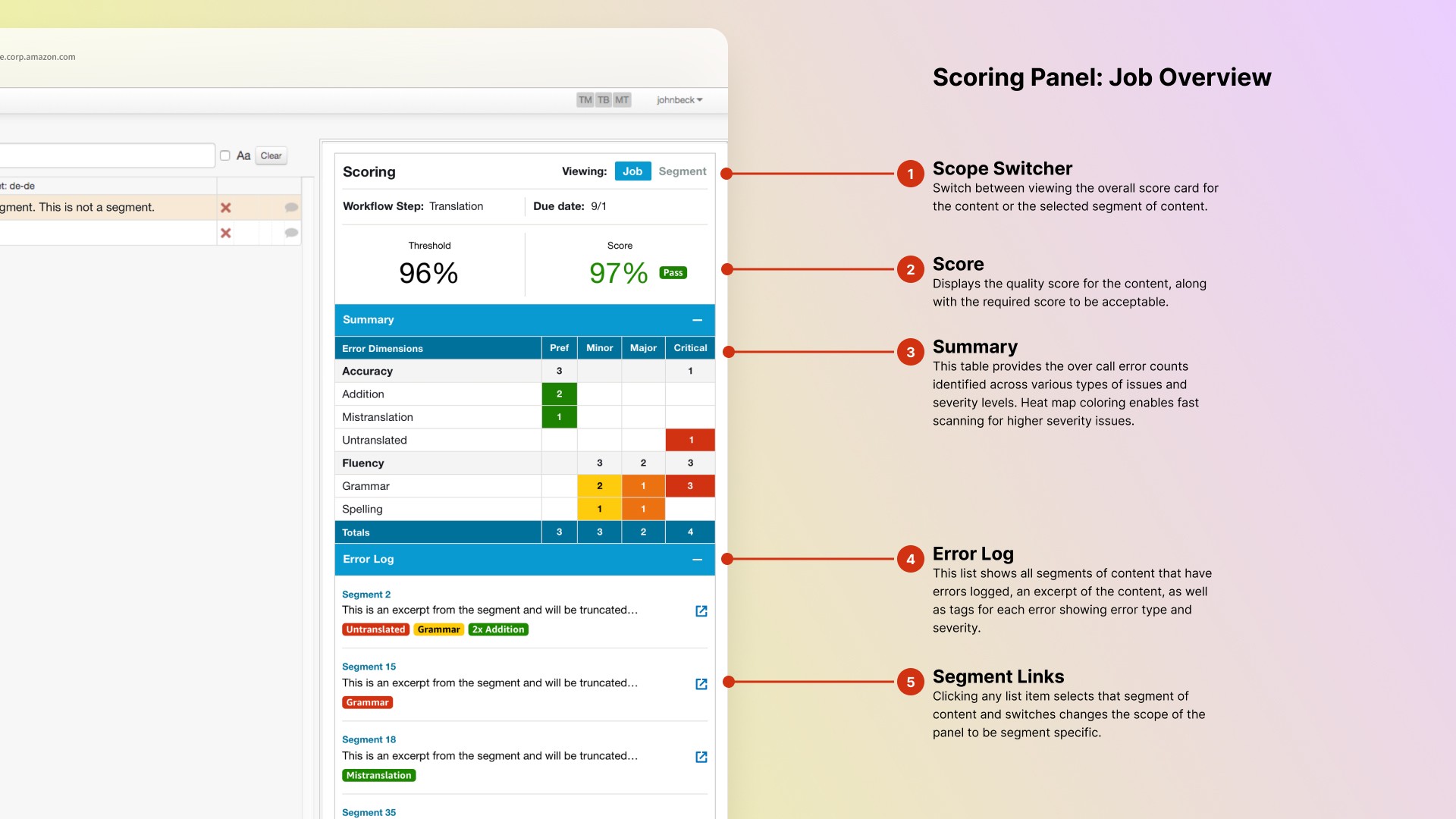
I designed a custom scoring panel to embed directly into the translation tool so linguists could log errors while editing. The panel consisted of two main views: the overall scorecard and the segment specific error details.
The scorecard showed which errors counted and why, with clear definitions. It gave reviewers guidance and provided transparency to original translators and QA managers. An error log showed each segment of content that has errors along with the types and severity of the issues. This provided a high level overview as well as the ability jump to the details of specific errors.
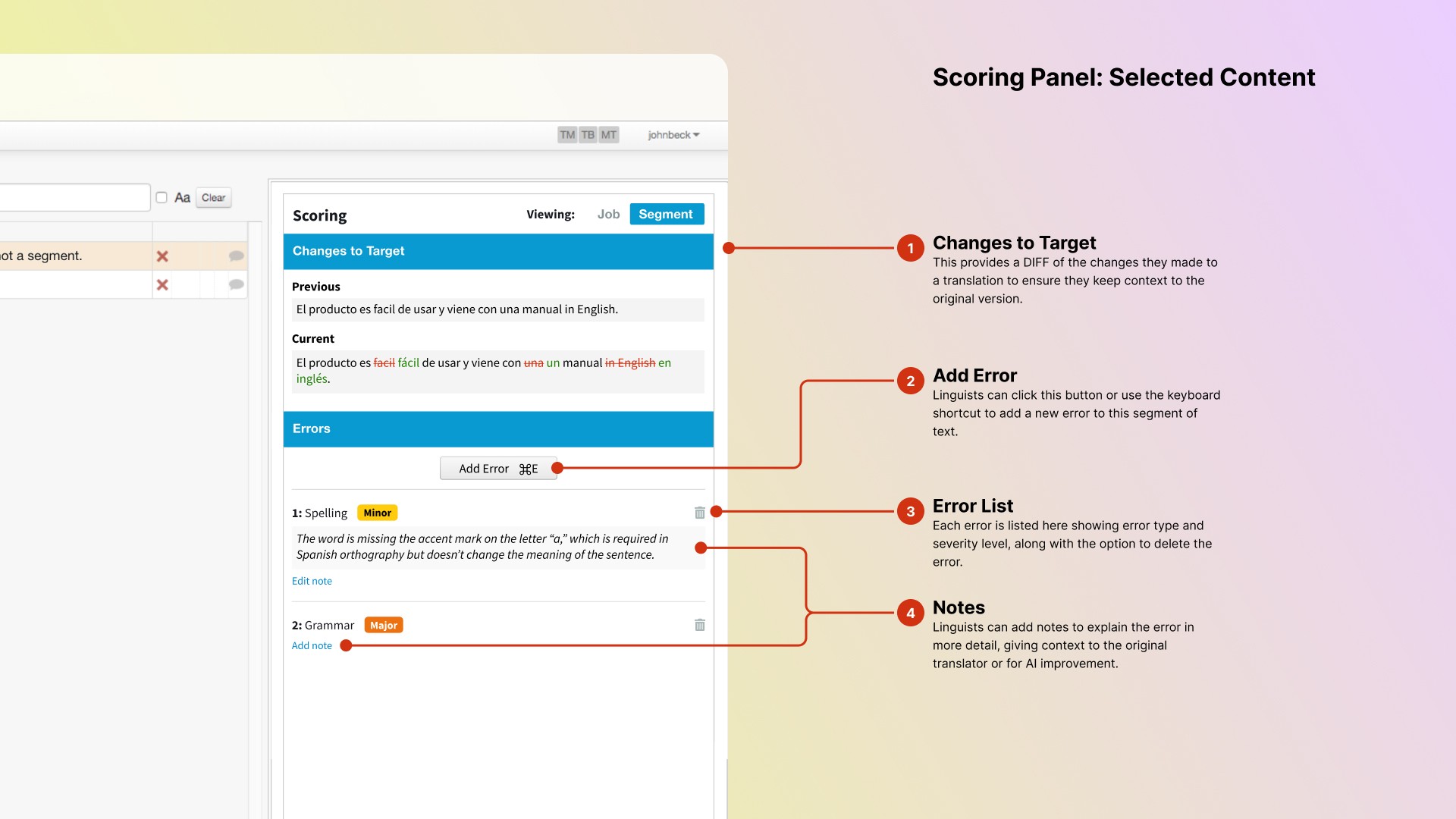
When making revisions to a segment of text, the error details shows a diff between the original text and their revisions, enabling reviewers to quickly see what changes they made. Segments of text can vary in length and often contain multiple issues so each segment has its own list of errors with
Once a review submits their work, the scorecard is processed by an auditing system and passed into feedback loop workflows.
Finding the right level of simplicity
Our initial idea was to make the scorecard itself clickable—just tap a cell in the type/severity table to log an error. But during early testing with linguists, we heard the same thing: while it reduced clicks, it increased cognitive load. Reviewers had to scan rows and columns, trying to remember where they left off and what each box meant.
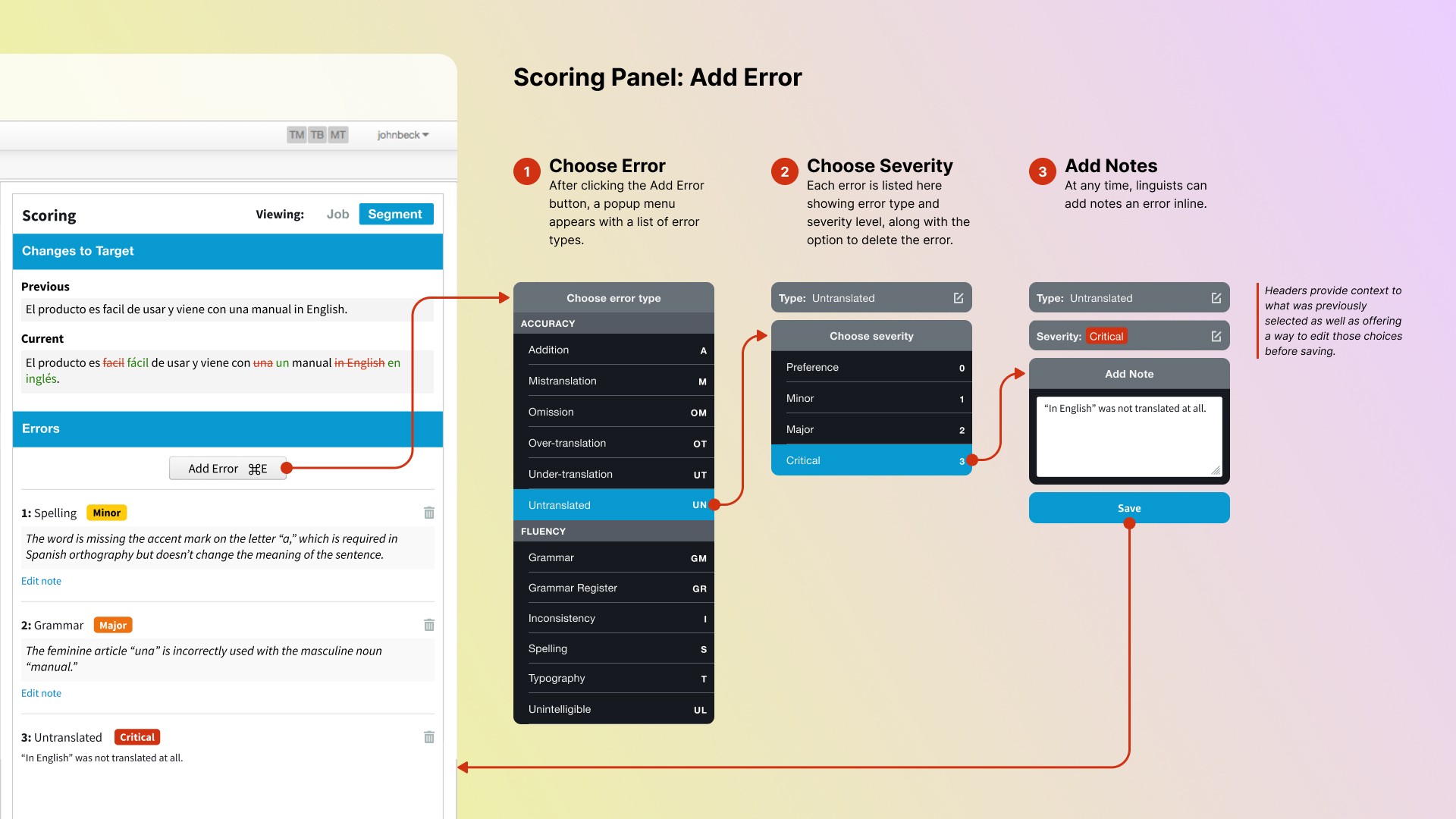
So I designed a new component from scratch—one that blended the familiarity of a dropdown with the structure of a progress stepper. The result was a focused three-step flow:
Choose error type (with short code support)
Choose severity (0–3 scale)
Add optional notes
This kept data entry compact and recoverable. Users could navigate via mouse or keyboard, and go back a step to fix mistakes without starting over.
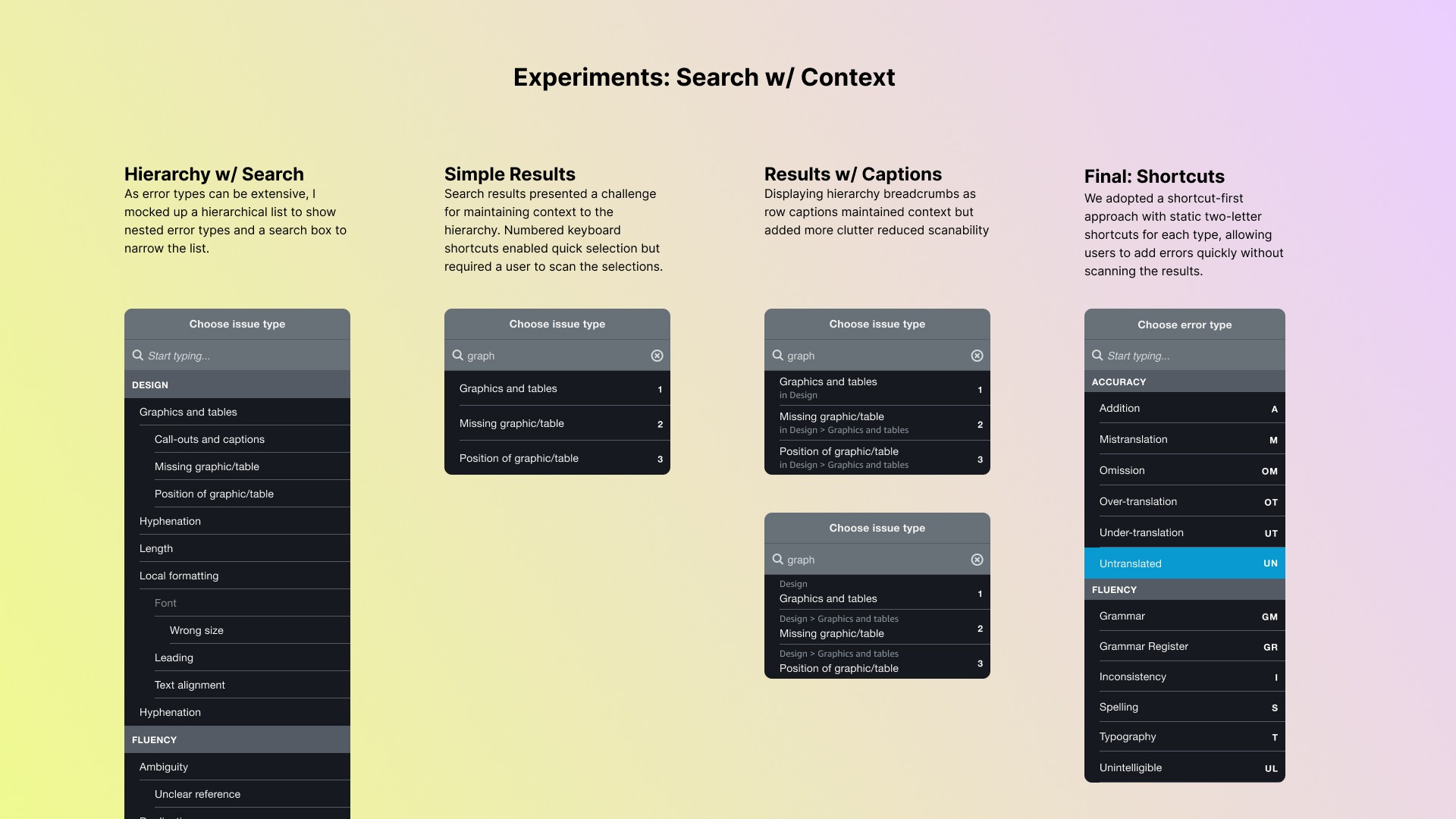
I also advocated for keyboard navigation from day one. Errors could be added with a shortcut, typed using two-letter codes for error types, and confirmed with number keys. Linguists were already used to using shortcuts for most functions and this enabled them to stay in flow without reaching for the mouse.
By focusing on mental overhead—not just interaction count—we made the input experience smoother, smarter, and easier to adopt.
But it paid off
We validated our designs early and often, gathering feedback from a rotating group of 40 freelance linguists. We presented them with clickable mockups, a prototype, and a final usability review before launch. Each time we observed them walk through a scoring job to see how they:
Switch between job and segment level views of errors.
Add errors using keyboard shortcuts versus mouse.
Skim logs to understand common issues.
Key takeaways:
Navigation model was intuitive
Severity color coding helped with triage
Diff views were a popular addition that was highly sought after.
Users requested better filtering in the error log so they could review commonalities of error types, or severity before submitting.
Outcomes & Impact
This project delivered a fully integrated scoring workflow that:
Reduced time-to-score for freelancers — from an estimated 30 minutes per 100 segments using spreadsheets to under 5 minutes in the tool
Eliminated spreadsheet-based logging
Supported multiple scoring models for different customers
Improved data trust and auditability for quality managers
Enabled broader adoption of freelance reviewers by building confidence in internal QA tools
Translation scoring enabled our operations to confidently and efficiently route more volume to freelance linguists, saving $12.5 million per year over 3rd party vendors.
It also laid the groundwork for future AI training and revision tooling, by creating a persistent, structured record of errors and reviewer rationale. These labeled errors now serve as trustworthy training data—fueling model evaluation and supervised learning use cases downstream.
Reflection
This project reminded me that quality at scale doesn’t come from automation alone. It comes from thoughtful systems that leverage human judgment. Logging translation errors might seem like a invisible task, but for the people doing it, it’s front and center. In order to drive AI innovation and improvements, we needed to design workflows that make it easy—and worth it—for humans to provide good feedback.
By embedding scoring directly into the review flow, we made a high-effort task feel purposeful, not punishing. We reduced friction, respected the reviewer’s time, and captured structured data without disrupting their work.
Strategic takeaway: Build tools that support people, and they’ll support your systems.